
An orphan-order alarm for NinjaTrader 8 trade copiers
If a follower account is left holding an order or position your leader doesn’t have, Ombra Watch sounds an alert in NinjaTrader and emails you. It is read-only: it never places, changes or cancels an order.
Get Ombra Watch: $19/month Install guide
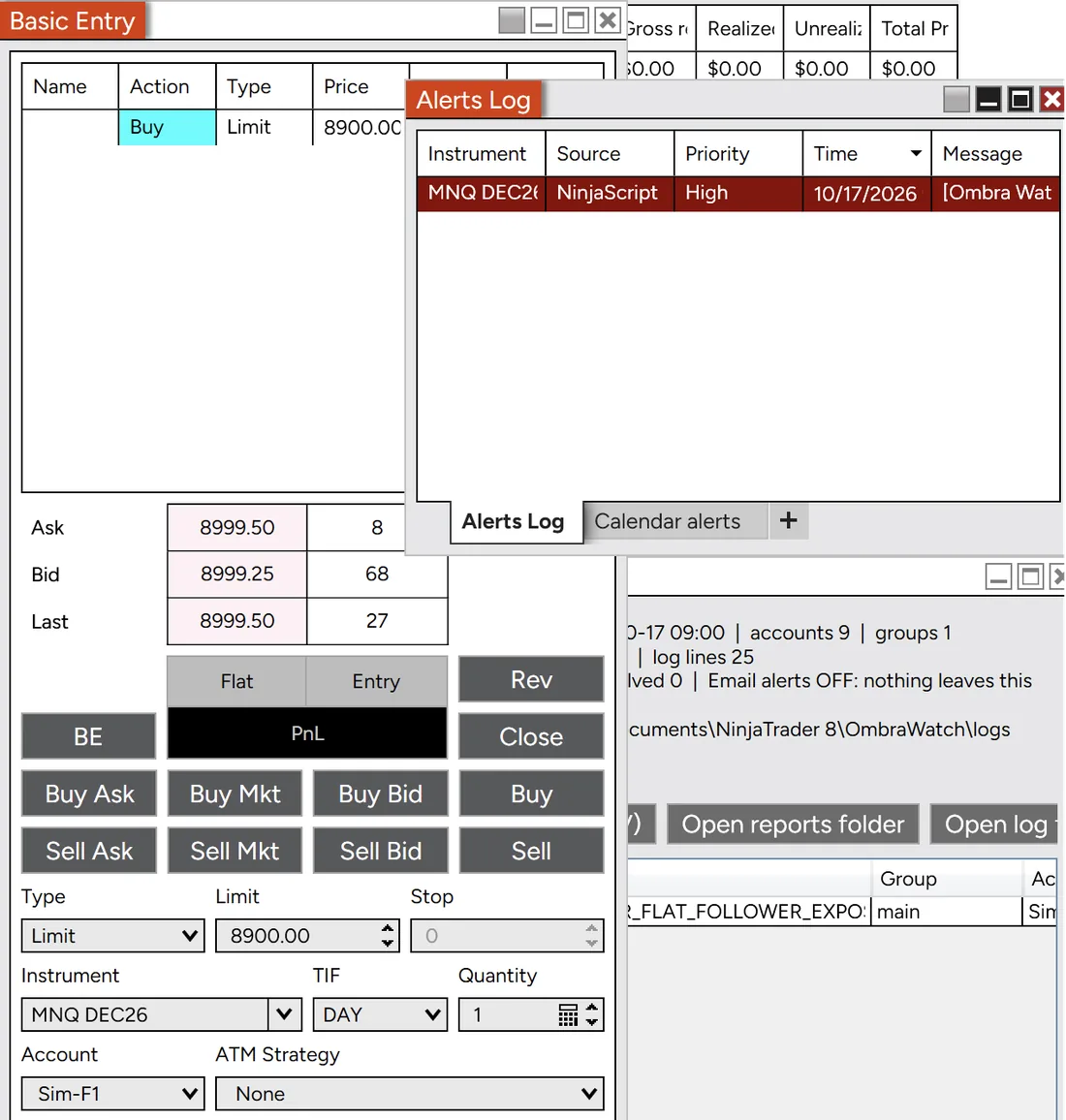
- A Buy Limit 100 points under the market, on the follower Sim-F1 only. The leader, Sim-L, is flat.
- 3–4 seconds later the alarm sounds and a red High line appears in the Alerts Log.
Real NinjaTrader 8, simulated accounts, 17 October 2026, 09:04.
What it catches
Four checks every second for every follower. A problem must last 3 seconds before it alarms, so in testing on real NinjaTrader 8 with simulated accounts the alarm came 3 to 4 seconds after it.
The four checks, and what it won’t do
Four checks, every second, for every follower in every group. A problem has to last 3 seconds before it alarms, so normal copy delays don’t set it off. That 3-second wait, plus up to a second until the next check, is why the alarm came 3 to 4 seconds after the problem in our testing.
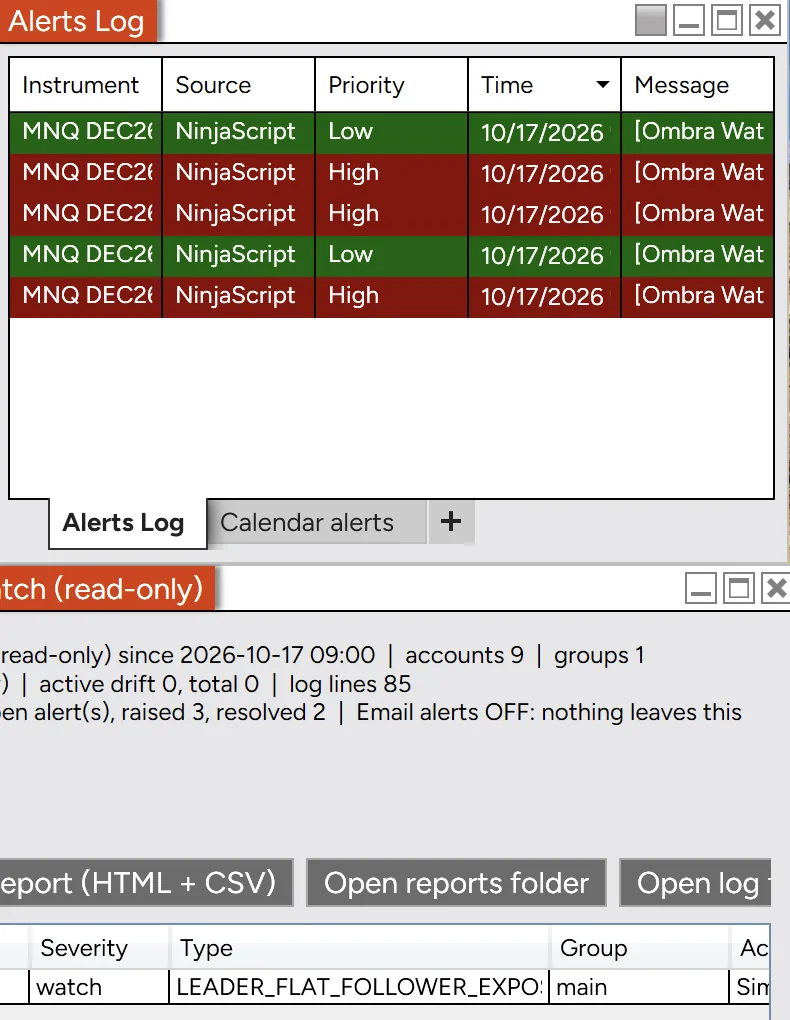
LEADER_FLAT_FOLLOWER_EXPOSED- Leader flat, follower exposed. The leader has no position and no orders, but a follower still has a resting entry order or an open position. This is the one that blows accounts. In testing: alarm in 3–4 seconds, all-clear about 4 seconds after the fix.
ORDER_NOT_ON_LEADER- Order not on the leader. A follower has more working entry orders on a side than the leader does: a stray limit, a stop entry that should have been cancelled, a double.
REVERSED_VS_LEADER- Reversed against the leader. A follower is short while the leader is long, or the other way round.
NO_PROTECTIVE_STOP- No protective stop. A follower holds a position with no working stop on the closing side.
What it won’t do
- Fix anything for you. Watch is read-only by design, so you, or your copier, take the action.
- Watch accounts that aren’t connected in NinjaTrader 8, or alert while NinjaTrader is closed.
- Guarantee you won’t lose money. It’s an alarm, not a stop. Keep your own stops and limits in place.
Email alerts
Paste your install code and every alert, and every all-clear, also reaches your inbox. No prices, market data or balances are ever sent.
What an alert email contains
![An iPhone mail screen showing an email from Ombra Watch with the subject: [Ombra Watch] Test alert: email alerts are working. The body says NEEDS ATTENTION, test alert, and that no prices are ever sent to or stored by the Ombra alert relay.](/assets/img/alert-email-test.webp)
Paste your install code into Watch’s settings and every alert, and every all-clear, comes to your inbox as well as sounding in NinjaTrader.
Each email carries the account name, the issue, the symbol root (for example MNQ), side, size, order type, time and group name. No prices, no market data and no account balances are ever sent. With email switched off, nothing leaves your PC at all.
Watch runs inside NinjaTrader, so alerts stop if NinjaTrader is closed.
Setting it up
About ten minutes: import the zip in NinjaTrader 8, name your leader and followers, then test on a simulated account. Step by step: the install guide.
The short version
Import the zip in NinjaTrader 8 with Tools › Import › NinjaScript Add-On. No unzipping, no installer. Then tell it who leads: a short file names your leader, its followers and each follower’s size multiplier (1 for the same size as the leader, 2 for double), and Watch can write the template for you. Several groups are fine.
Paste your install code to get email alerts on your phone, place a test order on a sim follower, and listen for the alarm.
Documents\NinjaTrader 8\OmbraWatch\groups.csvaccount,group,multiplier,role
APEX-12345-01,main,1,leader
APEX-12345-02,main,1,follower
APEX-12345-03,main,1,followerWho it is for
Traders who copy one leader account to several evaluation or funded accounts in NinjaTrader 8 on Windows.
Why it exists, and what it needs
The leader closed. The copier didn’t cancel a resting buy limit on the followers. Price came back, filled them, and kept going the wrong way. By the time anyone looked, five accounts were gone.
Copiers fail quietly: an app closes, a connection drops, a cancel never arrives. Ombra Watch sits beside whatever copier you use, compares every follower to its leader once a second, and sounds an alarm when they don’t match.
Craig ShuttleworthProp trader, UK. Founder of Ombra.
- Who it’s for
- Traders who copy one leader account to several evaluation or funded accounts. If you trade a single account and do not use a copier, you do not need it.
- Needs
- NinjaTrader 8 on Windows or a Windows VPS, with your accounts connected. Windows in Parallels on a Mac worked in our testing; it is not officially supported by NinjaTrader.
- Works with
- Any copier, as long as the accounts it trades are connected in your NinjaTrader 8.
Price
One subscription covers every account and every group on one NinjaTrader 8 install, with on-screen, sound and email alerts.
$19 a month
- Price
- $19 a month, billed monthly, plus VAT or sales tax where it applies. Cancel any time and it stops at the end of the month you’ve paid for.
- Refund
- 14 days, no questions asked. Just email us.
- Delivery
- Your download link and install code arrive by email, usually the same day.
- Data
- Alerts contain account names, the issue, symbol root, side and size. Never prices, never sold, never shared with prop firms.
Secure checkout by Stripe, which handles payment and any tax as our reseller. By subscribing you agree to the terms. Already subscribed? Manage your subscription. Questions first? craig@ombratrading.com
Ombra Watch is an alarm, not a stop: keep your own stops in place. Not financial advice. Risk warning.
Recommended resources
NinjaTrader, Kinetick market data and a Chicago VPS. Some of these links are affiliate links.
The resources
Ombra Watch runs inside NinjaTrader 8. Kinetick provides free end-of-day market data for NinjaTrader, and Ninja Mobile Trader hosts NinjaTrader on a Chicago VPS.
 The trading platform Ombra Watch runs in.
 Free end-of-day market data for NinjaTrader.
- Ninja Mobile Trader VPSUltra low latency (<1ms) Chicago-optimised trading servers for running NinjaTrader, indicators and automated strategies. Reach the same trading workspace from a PC, Mac, tablet or phone without leaving your home computer running.
Some links in this section may be affiliate links. If you open an account through one, we may earn a commission at no extra cost to you.
Questions
Answers about copiers, orders, data and cancelling are in the help centre.